learn how to use the command line. spend a week or so getting used to doing file operations like moving, copying, extracting, etc on the CLI to get a feel for it.

blakeus12 [he/him]
- 6 Posts
- 51 Comments
Joined 3 years ago
Cake day: August 2nd, 2023
You are not logged in. If you use a Fediverse account that is able to follow users, you can follow this user.
 3·3 years ago
oh my goodness, you’re right. ghyna is just evil and we shouldn’t think any harder into the dynamics and inner workings at play. i am smart
 1·3 years ago
sorry, page not found. but another user linked an arch wiki page and I think that will work
i have an msi g something monitor, goes up to 165 hz. And it’s configurable, or at least i’m pretty sure. i changed it from 60 to 165 after i installed fedora, but i did that through fedora’s gui
Sorry, should have included that. i have a custom built with an intel i5-12400f, 1660 super amd 32 gb of ram. I’m using the latest nvidia driver on gnome, same driver i used on linux mint
I’m a DeaDBeeF fan. i used it on windows and still use it on linux
that is exclusively how i use it, thanks for the tip
thank you for the suggestion! i ended up uninstalling pop and windows then doing windows first but i appreciate the suggestion
i have done that successfully at the cost of my sleep schedule lmao.
this is indeed, pretty damn weird. I’m going to go with uninstalling pop os, and getting windows first on the smaller drive, then getting either KDE Neon or Linux Mint on the bigger one. kinda sucks, i wish i couldve just installed but it doesn’t seem like there is anything i can do. thank you so much for the help, comrade.

at this point i am considering uninstalling Pop and getting win10 first because linux actually has sensible ways to dual boot even on the same drive. that’s probably what i’ll have to do.
do i need to install the grub bootloader? because no matter what i do holding shift doesn’t do anything. i am on windows reinstall number 3 now
thank you i will try.
yes, there’s an NTFS partition. Heres a screenshot:

Thank you! I will definitely take a look at those
thanks! i will check those out
sorry! i will edit the post to include the following: i don’t really care about the quality too much, i want to spend ~80 usd or so, but that’s flexible within 10 dollars or so. i would prefer a headset that has a USB dongle, like a wireless mouse. i don’t really need a microphone in it, but i wouldn’t really conplain if there was one.
gnome may be the desktop environment, depending on your distro. it looks like this:
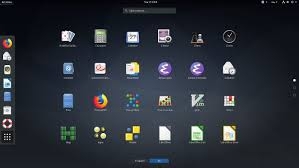
if your desktop looks like that, it’s gnome (Pop_! OS, Ubuntu/Kubuntu, and a few others come with it by default)
linux mint comes with flatpak